Cloud gaming has completely changed how we play. You can stream blockbuster games from GeForce NOW, Xbox Cloud Gaming, or PlayStation Plus on almost any device — no expensive gaming PC required.
But here’s the catch: your network matters more than your hardware. A single lag spike can ruin a match, and inconsistent Wi-Fi can turn smooth gameplay into a stuttering mess.
With Wi-Fi 7 now hitting the market and Wi-Fi 6E becoming mainstream, many cloud gamers are asking the same question:
Should I upgrade to Wi-Fi 7 now, or is Wi-Fi 6E still enough?
Let’s break it down clearly, from a gamer’s point of view.
How to Identify and Check Your Router’s Wi-Fi Generation
Before we dive deep into our article, if you’re unsure which Wi-Fi standard your router supports, here are some simple ways to check:
1. Check the Router Model – Router label
- Look at the label on your router (usually on the bottom or back). It will have the model number.
- Search online for your router model to see its specifications. The manufacturer’s website usually lists the Wi-Fi standard (Wi-Fi 5, 6, 6E, 7, etc.).
- Routers often have Wi-Fi logos on the box or router:
- Wi-Fi 5 → 802.11ac
- Wi-Fi 6 → 802.11ax
- Wi-Fi 6E → 802.11ax with 6 GHz support
- Wi-Fi 7 → 802.11be
2. Using Router Adming page
- Open a browser and go to your router’s admin page (common addresses: “
192.168.0.1“ or “192.168.1.1“). - Login with your admin credentials.
- Look under Wireless Settings, Network Info, or About Router. It usually lists the Wi-Fi standard (802.11ac = Wi-Fi 5, 802.11ax = Wi-Fi 6/6E, 802.11be = Wi-Fi 7).
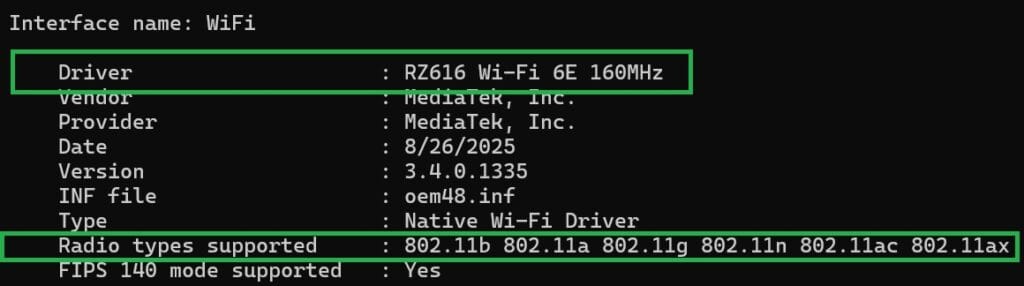
3. Using Command Prompt (Easy)
- On Windows:
- Press Win + R, type
cmd, and press Enter. - Type
netsh wlan show driversand press Enter. - Look for Radio types supported
- (802.11ax = Wi-Fi 6-e).
- (802.11be = Wi-Fi 7)
- Press Win + R, type
- On Mac:
- Hold Option and click the Wi-Fi icon in the menu bar.
- Check PHY Mode (802.11ac = Wi-Fi 5, 802.11ax = Wi-Fi 6).
4. Using Mobile Phones
Here’s the fastest way to check your router’s Wi-Fi generation using just your phone:
- For Android:
- Download a network info app like WiFi Analyzer or Fing (free on Google Play).
- Open the app and scan for your Wi-Fi network.
- Look at the Freque types supported
- 2.4 GHz → older Wi-Fi (Wi-Fi 4/5 possible)
- 5 GHz → Wi-Fi 5 or Wi-Fi 6
- 6 GHz → Wi-Fi 6E
- If the app shows Wi-Fi 7 / 802.11be, your router supports Wi-Fi 7
- Some apps also show standard/protocol directly (802.11ac = Wi-Fi 5, 802.11ax = Wi-Fi 6/6E).
- For Iphone:
- Go to Settings → Wi-Fi and tap the info (i) icon next to your network.
- You can see the channel and band (2.4 GHz / 5 GHz / 6 GHz).
- 6 GHz usually indicates Wi-Fi 6E.
- 5 GHz could be Wi-Fi 5 or 6.
- For more detailed info, apps like Airport Utility or Fing can detect the Wi-Fi generation.orted
What’s New with Wi-Fi 7 (and Why Gamers Care)
Wi-Fi 7 (802.11be) isn’t just a small upgrade — it’s a major leap forward in how wireless networks work.
Key Features
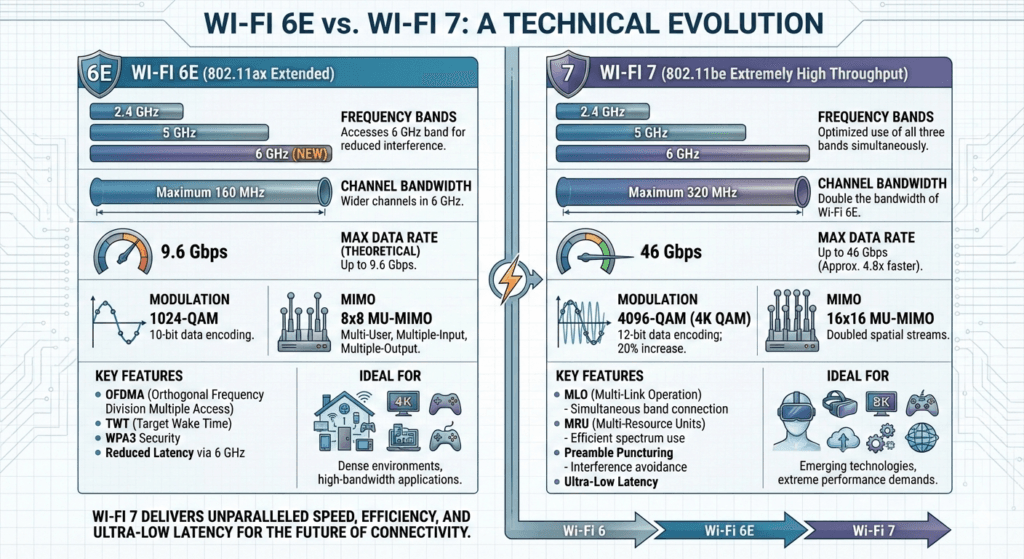
- 320 MHz channels – Twice as wide as Wi-Fi 6E, allowing much higher speeds.
- 4096-QAM – Sends more data per signal, improving throughput.
- Multi-Link Operation (MLO) – Devices can use multiple bands at the same time (2.4, 5, and 6 GHz), choosing the fastest and cleanest path dynamically.
- Ultra-low latency – Sub-5 ms wireless latency is now realistic.
- Higher device capacity – Designed for crowded homes with dozens of connected devices.
- Preamble puncturing – Avoids blocked parts of channels to reduce interference.
Why This Matters for Cloud Gaming
MLO is the real game-changer. Instead of relying on one band, your gaming device can hop between multiple bands instantly to avoid congestion — meaning:
- Fewer lag spikes
- Lower jitter
- More stable gameplay during peak household usage
Wi-Fi 6E vs Wi-Fi 7: Real-World Gaming Performance
Speeds (Theoretical vs Reality)
- Wi-Fi 6E
- Theoretical: Up to 9.6 Gbps
- Real-world: ~1–2.5 Gbps per device on 6 GHz
- Latency: ~5–15 ms (ideal conditions)
- Wi-Fi 7
- Theoretical: Up to 46 Gbps
- Real-world (early tests): ~3–5 Gbps per device
- Latency: ~2–5 ms, even under load
What That Means for Gaming
👉Cloud gaming doesn’t need gigabit speeds — but it does need low latency and stability.
👉You want wireless performance that rivals Ethernetng.
👉Wi-Fi 6E already handles 1080p and 4K cloud gaming very well.
👉Wi-Fi 7 shines when:
👉Multiple people are streaming, downloading, and gaming at the same time
👉You’re playing competitively and care about every millisecond
Speed, Latency, and Real-World Gaming Performance
Theoretical vs. Real-World Speeds
- Wi-Fi 6E: Up to 9.6 Gbps (theoretical), real-world single-device speeds of 1–2.5 Gbps on 6 GHz, with 5–15 ms latency in ideal conditions.
- Wi-Fi 7: Up to 46 Gbps (theoretical), real-world single-device speeds of 3–5 Gbps (early tests), and latency as low as 2–5 ms, even under load.
Benchmarks:
- Wi-Fi 7 delivers 2–4x faster throughput than Wi-Fi 6E at close range.
- In multi-device scenarios, Wi-Fi 7 networks maintain higher speeds and lower latency, even with 50+ devices connected.
- At long range, Wi-Fi 7 maintains >1 Gbps, while Wi-Fi 6E drops below 500 Mbps.
Latency and Jitter: The Gamer’s Perspective
- Cloud gaming is ultra-sensitive to latency and jitter. Even small spikes can cause rubber-banding, input lag, or blurry frames.
- Wi-Fi 6E’s 6 GHz band already delivers low, stable latency (5–15 ms typical in the same room).
- Wi-Fi 7’s MLO reduces latency by 20–50% compared to Wi-Fi 6E, especially in congested or multi-device environments. Real-world tests show sub-5 ms ping times are possible with the right setup.
Router Availability, Pricing, and Mesh Systems
Wi-Fi 6E Routers
- Mature and affordable
- Price range: ~$120–$400 (mesh systems ~$250–$600)
- Great value for most gamers today
Wi-Fi 7 Routers
- Now mainstream with models at every price tier
- Price range: ~$90–$2,000+
- Gaming-focused models offer:
- Dedicated gaming ports
- Sub-5 ms wireless latency
- Multi-gig wired and wireless backhaul
Bottom line: Wi-Fi 7 is no longer “luxury only,” but high-end mesh systems are still expensive.
Wi-Fi 7 routers are now mainstream, with options for every budget. Mesh systems are essential for large homes or if you want seamless gaming in every room.
Device Support and Compatibility: Phones, Consoles, and PCs
Wi-Fi 6E Devices
- Most flagship phones from 2021–2024
- Modern laptops
- Gaming PCs via adapters
- Consoles: PS5 and Xbox Series X|S support Wi-Fi 6 (not 6E), but still benefit from 6E routers
Wi-Fi 7 Devices (2026)
- Many flagship Android phones
- New gaming laptops
- Some high-end PCs
- PlayStation 5 Pro is the first console with Wi-Fi 7 support
If your main gaming device doesn’t support Wi-Fi 7, you won’t see its full benefits — even with a Wi-Fi 7 router.
Cloud Gaming Platform Requirements
Understanding your network platform requirements is key to achieving the ultimate cloud gaming experience. By evaluating your current hardware and internet connection speed, you can determine whether upgrading your router is necessary or if your existing setup is sufficient. Planning ahead is also important, as future games will demand faster and more stable connections. Making informed choices now ensures smoother gameplay today and keeps you ready for the network demands of tomorrow.
Cloud Gaming Network Requirements by Platform
Backward Compatibility and Mixed-Device Networks
- Wi-Fi 7 and 6E routers are fully backward compatible. Your older devices (Wi-Fi 5/6) will connect just fine, but won’t get the speed or latency benefits of the new standard.
- Mixed networks are the norm: Most homes will have a mix of Wi-Fi 5, 6, 6E, and 7 devices for years to come.
- Performance tip: The slowest device on a band can limit performance for others. Use separate SSIDs for 2.4, 5, and 6 GHz bands to keep older devices from dragging down your gaming gear.
Practical Setup Tips for Cloud Gamers
Router Placement & Band Selection
- Place your router centrally and elevated.
- Use the 6 GHz band if your device supports it and you’re in the same room.
- For larger homes, use a mesh system with wired backhaul if possible.
QoS & Smart Queue Management
- Enable QoS or SQM to prioritize gaming traffic.
- Set bandwidth limits to ~85–95% of your actual internet speed.
- Keep firmware updated.
Wired vs Wireless
- Ethernet is still king for absolute lowest latency.
- Wi-Fi 7 gets very close — often close enough for competitive gaming.
- Best setup: Ethernet for your main gaming system, Wi-Fi 7 for everything else.
Mesh Systems
- Essential for multi-room gaming.
- Use wired backhaul between nodes if possible.
- Place nodes 30–50 feet apart, elevated, and unobstructed.
ISP & Internet Considerations
- Fiber is best: lowest latency and highest upload speeds.
- Cable and 5G home internet can work well but may suffer during peak hours.
- Satellite (Starlink): Much improved, but still prone to occasional latency spikes.
Always test your latency to the cloud gaming service — not just a random speed test server.
Cost-Benefit Analysis: Who Should Upgrade Now vs. Wait
Upgrade to Wi-Fi 7 If:
- You’re a competitive gamer who notices input lag.
- Your home has dozens of connected devices.
- You have multi-gig internet.
- You want future-proofing for the next 5+ years.
Stick with Wi-Fi 6E If:
- You game casually and already get smooth performance.
- Your budget is tight.
- Most of your devices are Wi-Fi 6/6E or older.
- You’re satisfied with your current setup.
Future Trends: Adoption Timeline, Device Roadmap, and Wi-Fi 8 Outlook
- Wi-Fi 7 adoption is accelerating fast.
- Prices are dropping every quarter.
- Wi-Fi 8 is still several years away.
- Cloud gaming, AR/VR, and smart homes will increasingly depend on ultra-low-latency wireless networks.
- AI-driven network optimization and automated frequency coordination will further improve performance.
Energy, Heat, and Device Power: TWT and Battery Impact for Mobile Gamers
- Target Wake Time (TWT): Wi-Fi 6/6E/7 devices use TWT to schedule wake/sleep cycles, improving battery life for phones, tablets, and IoT devices.
- Wi-Fi 7’s R-TWT: Adds more precise scheduling for latency-sensitive traffic (like cloud gaming), balancing energy efficiency and performance.
- Real-world impact: Mobile gamers see longer battery life and less heat, especially on Wi-Fi 7 devices with advanced TWT features.
Conclusion: Should You Upgrade?
Wi-Fi 7 is the future of wireless gaming . It is faster, more stable, and significantly lower latency than anything before it. For cloud gamers, it means smoother gameplay, fewer lag spikes, and the freedom to play anywhere in the house with confidence.
However, Wi-Fi 6E is still excellent and more than capable of handling 4K cloud gaming today at a much lower cost.
Upgrade to Wi-Fi 7 if:
- You want the absolute best wireless gaming experience.
- You’re ready to invest in future-proofing.
- Your devices support Wi-Fi 7 (or will soon).
Stick with Wi-Fi 6E if:
- Your current setup works well.
- You’re on a budget.
- You want proven, stable performance without overpaying.
No matter which you choose, proper setup, router placement, QoS, mesh systems, and firmware updates — will have a bigger impact than raw Wi-Fi specs alone.for cloud gaming. The wireless future is bright, and with the right gear, you’ll be ready for whatever comes next.
Yes. Wi-Fi 7’s Multi-Link Operation and 320 MHz channels can reduce latency by 20–50% compared to Wi-Fi 6E, especially in busy homes. Sub-5 ms ping times are possible with the right setup. However, Ethernet still offers the lowest, most stable latency for competitive play.
Yes, to get the full speed and latency benefits, both your router and your gaming device must support Wi-Fi 7. Wi-Fi 7 routers are backward compatible, so your older devices will still connect, but won’t see the new features.
Absolutely. Wi-Fi 6E’s 6 GHz band delivers more than enough bandwidth and low latency for 4K/60 or even 4K/120 cloud gaming, as long as you’re close to the router and not in a congested environment.
Yes. Wi-Fi 7 routers are fully backward compatible with Wi-Fi 6E, 6, 5, and even 4 devices. However, older devices will only operate at their maximum supported speeds and features.
Upgrade now if you’re a competitive gamer, have a crowded smart home, or want to future-proof for the next 5+ years. Otherwise, Wi-Fi 6E remains an excellent, affordable choice. Prices for Wi-Fi 7 gear will continue to drop, and device support will expand rapidly through 2026.
No. 6 GHz signals (used by both Wi-Fi 6E and 7) have limited wall penetration. However, Wi-Fi 7’s MLO can switch bands automatically to maintain a stable connection, even if one path is blocked.
In theory, yes—Wi-Fi 7’s maximum speed exceeds standard Gigabit Ethernet. But in practice, Ethernet is still more stable and consistent, especially for competitive gaming.
If you have a large or multi-story home, a Wi-Fi 6E or 7 mesh system ensures stable, low-latency gaming in every room. For small apartments, a single high-quality router may be enough.
Play PC Games Instantly
No downloads. No expensive gaming PC. Play your Steam, Epic and other supported games directly from the cloud.