I spent the last few weeks testing Boosteroid. I used it on my laptop, my phone, and even an old smart TV that has no business running modern games. My goal was simple. I wanted to know if Boosteroid holds up as a daily cloud gaming service, or if it’s just a cheaper name that can’t back up the price.
Here’s the short version. Boosteroid is a solid, budget friendly cloud gaming service. It works well if your internet connection is decent. It’s not chasing the best possible visual quality, but it gets the job done. It’s cheaper than its competetors like Geforce now in most cases. It doesn’t cap your monthly playtime. And it runs on almost anything with a screen. But it also has some downsides. That said, This article covers everything I found, the good parts and the bad parts.
What Is Boosteroid?
Boosteroid is a cloud gaming platform. It lets you stream PC games from remote servers instead of running them on your own hardware. Here’s how it works. You connect your existing Steam, Epic Games, Ubisoft Connect, or EA App account. You pick a game you already own. Boosteroid handles the actual processing on its end. Your device just shows the video and sends back your button presses.
This is called a “bring your own game” model. It’s important to understand before you sign up. Therfore boosteroid doesn’t give you free games. It gives you the power to run games you’ve already bought. If a game isn’t in your library on a supported store, you can’t stream it, even with a paid subscription.
The service has been around since 2019. It has grown into one of the largest independent cloud gaming providers. Its user base has climbed into the millions across Europe, North America, and South America. Microsoft also made a long term deal with Boosteroid. This brought Xbox PC titles onto the platform. Boosteroid has been steadily adding PC Game Pass games to its catalog too.
Getting Started with Boosteroid: Setup and Best Settings
1. Create Your Account
Go to Boosteroid’s website and sign up with your email.
2. Pick a Subscription plan
From your dashboard, go to Subscription > and choose your desired plan, we will talk more in depth into pricing and subscriptions later in this article.
3. Link Your Gaming Accounts
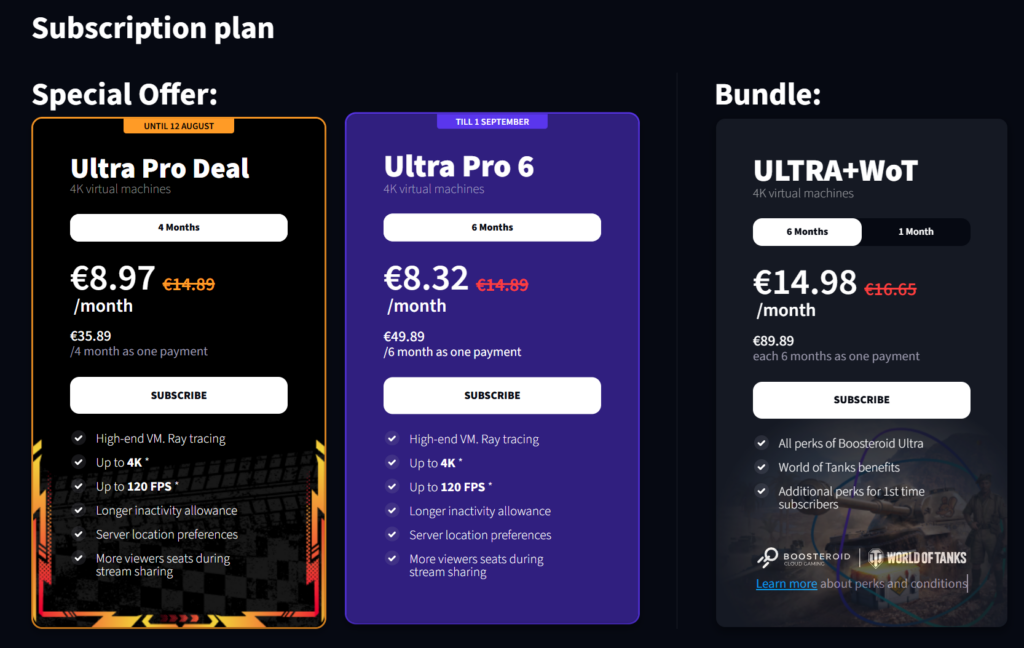
Boosteroid is a BYOL (Bring Your Own Library) service, so the service doesn’t give you games with the subscription. If you don’t own the game, you don’t play it, that’s why you need to connect the storefronts where you own your games. Boosteroid currently supports Steam, Xbox, and World of Tanks. You can also connect Epic Games, Ubisoft Connect, and the EA App, along with a growing number of PC Game Pass titles.
To link your stores: Click your profile section at the top right > then the My Account tab, you’ll find your connections > click Connect and approve your connection, and you’re all set.
4. Test Your Connection
The internet test connection will give you some critical information about your netwrok status and your ping to the nearest server, boosteroid only support EU, NA and 1 Server in SA(Brazil).
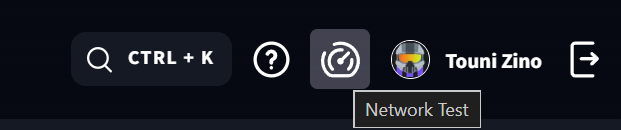
1. In your home page menu tabe cllick the network test button
2. Click Start Test to find your nearest server and netwrok stats
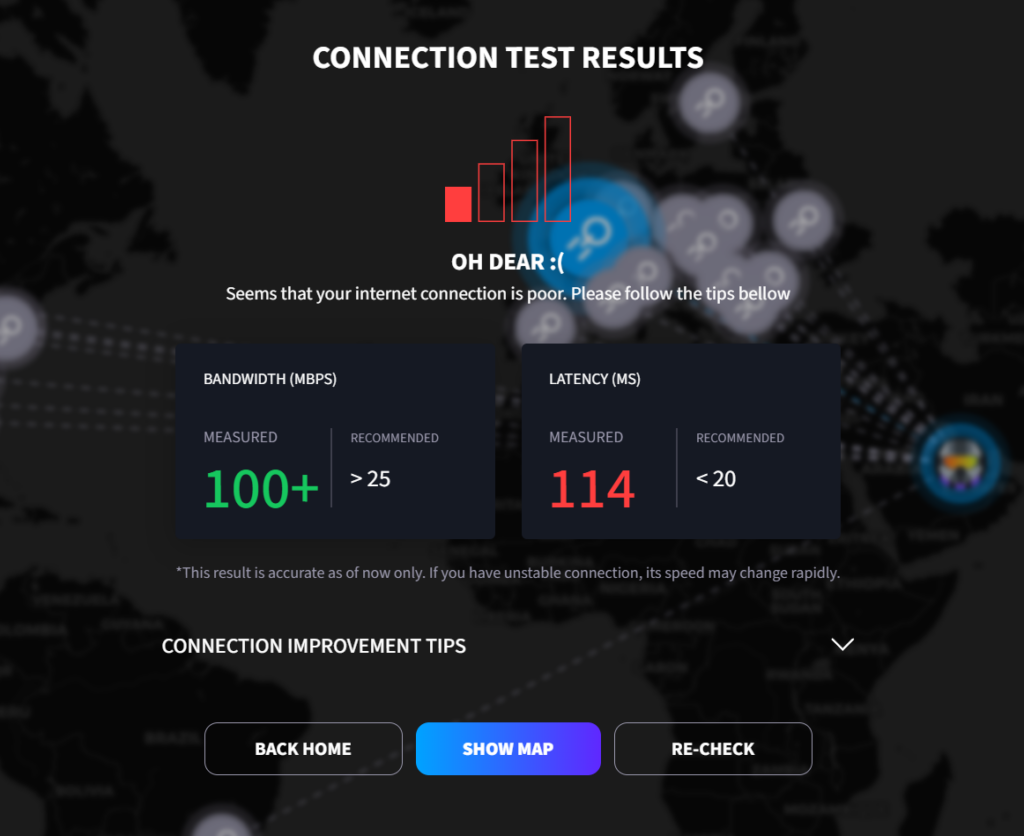
Here is a table of the Optimal and recommended netwrok requirement:
Boosteroid Official Network & Connection Requirements
| Requirement Metric | Target Specifications & Impact |
|---|---|
Minimum Speed Download Bandwidth |
15 Mbps
Baseline HD
The absolute minimum bandwidth required to launch games and maintain standard stream playback without dropping the connection. |
Recommended Speed Download Bandwidth |
25+ Mbps
Optimal / 60 FPS
The target speed for the smoothest experience, ensuring high visual fidelity without artifacting or compression blur. |
Server Latency Ping to Data Center |
< 20 ms
Response Time
Crucial threshold to ensure your controller inputs translate instantly to the screen, preventing noticeable input delay during gameplay. |
Connection Type Network Hardware |
✓
Wired Ethernet
5 GHz Wi-Fi
✗
Avoid: 2.4 GHz, 4G, or DSL
Stable mediums prevent packet loss and lag spikes. Older wireless standards and cellular connections are highly prone to interference. |
5. Launch and Play
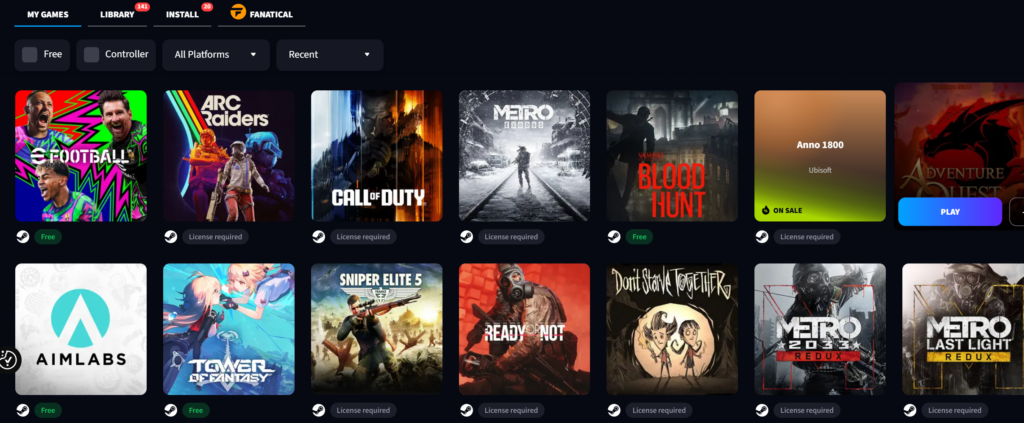
Pick a game from your linked library and hit play. Boosteroid loads it up on its own servers, so the first launch of a new game can take a little longer while it sets things up. After that, it’s quicker.
after launching the game a pop up will show to conect your store account, connect you store, approve the connection and dont worry about the location warning because you’re connecting to a remote server that might be in another country.
Note: always quit your game through its own in-game menu instead of just closing the tab or app. This lets the storefront, like Steam, properly register that you’ve actually stopped playing.
6. Set Your Stream Quality
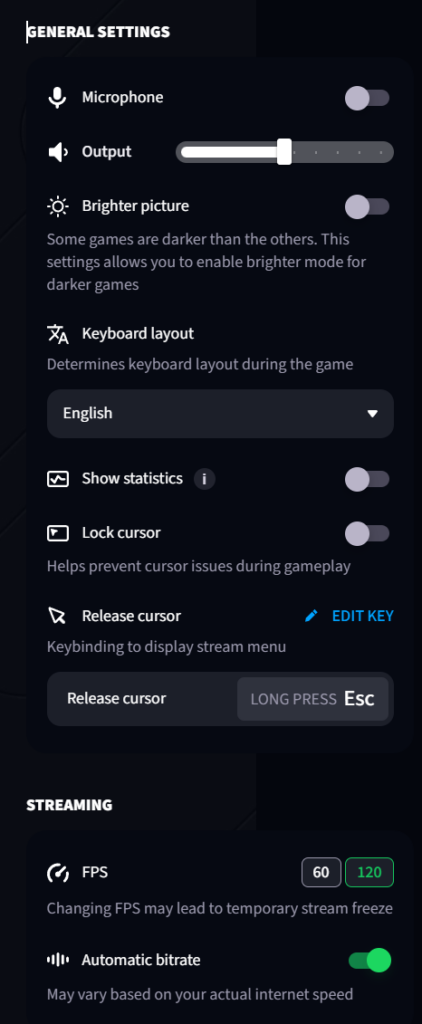
Boosteroid lets you manually pick your frame rate (60 FPS or 120 FPS) and bitrate, through the browser or the Windows and Mac apps. As a general rule, Boosteroid recommends setting your bitrate about 30% lower than your actual connection speed. This leaves some headroom so the stream doesn’t stutter if your speed dips for a moment.
If you’re not sure what to pick, leave it on automatic. Boosteroid adjusts quality on the fly based on your connection. If your speed drops for a moment, the stream lowers resolution briefly instead of freezing, then bounces back once things stabilize.
Genral Settings:
- Kepp eveything as it is uinless you want to show staticks or lock cursor (in case you’re using a controller)
Streaming Qaulity
- FPS: select 120fps if your screen supports it, othersie keep it as 60
- Bitrate: Keep automatic for best optimization
My Experience Using Boosteroid
Setup itself was quick, just like I walked through above. What stood out to me once I was actually browsing the dashboard was how uncluttered everything felt. The interface is clean. It’s not full of upsells or pop ups, which I appreciate. Games are organized by store and by genre. The search bar actually works well, not just matching exact titles.
Performance and Streaming Quality
Since I was kind of in a remote unsupported region, I couldn’t have a final accurate verdict. Even though the game was running smoothly and accurately, I only faced high ping and the latency was terrible. So I had one of my friends try it on a EU server with around 20ms, and it was a whole other experience. On a wired connection with decent speed, he had some really good sessions. The stream felt close to playing on a local PC. Sharp image, smooth motion, and controls that responded very well.
Over Wi-Fi during busy hours, things were different. I noticed small hitches when loading new areas. Sometimes a frame would drop for a second. This matches what I’ve seen in other user reviews too. People with a strong, stable connection in Central Europe tend to report very few problems. People further from Boosteroid’s servers report more noticeable lag.
Furthermore, there is a real limitation with the standard Ultra plan. You can’t pick which server you connect to. You get placed automatically, and that’s not always the closest or fastest option for your location, which can significantly affect performance if your nearest server is busy.
The higher Ultra Pro plan fixes this. It lets you manually choose your server. This is a big upgrade if latency matters most to you.
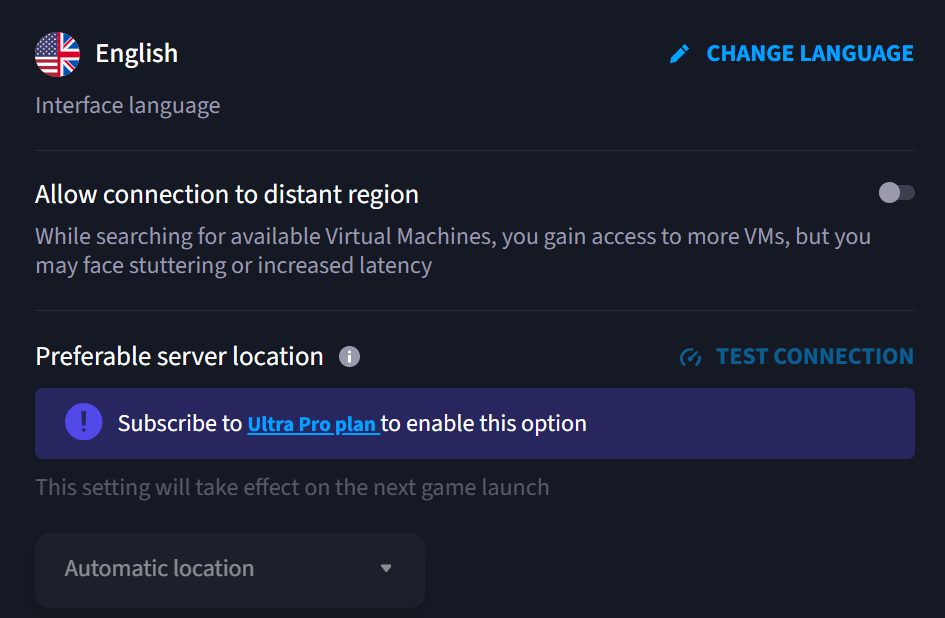
Session stability was mostly good. I didn’t get randomly disconnected very often. Gamepad compatibility adn connection was good, had no issues with my Xbox One Controller.
Game Library
Boosteroid’s game library has grown fast. It now has over 1,700 games. These come from Steam, Epic Games Store, Ubisoft Connect, the EA App, and a growing number of PC Game Pass titles. New games get added regularly, and there’s a request system if a game you own isn’t supported yet.
That said, the library is still smaller than GeForce NOW’s. GeForce NOW has over 4,500 games on its paid tiers. So if you have a big and varied Steam library, some of your games might not be supported yet. My advice? Search your specific games on Boosteroid’s website before you subscribe. They have a public library search you can use without an account.
I won’t claim that any specific big name games are or aren’t available, since this list changes often. What I can say is that the major game stores are covered well enough that most popular, actively played games have a good chance of showing up.
Supported Devices
One thing Boosteroid does really well is device support. During my testing, I got it running on:
Boosteroid Platform & Device Support
| Platform / Device | Access Method & Compatibility |
|---|---|
Windows PC & Laptops |
Native App
Web Browser
Play using the official Windows desktop application or directly through modern web browsers. |
Mac macOS Desktops & Laptops |
Native App
Web Browser
Fully supported through a dedicated macOS desktop app or via browser playback. |
Linux Desktop Distributions |
Native App
Ubuntu
Mint
Debian
Fedora
Dedicated Linux application package available for all major desktop distributions. |
Android Mobile & Tablets |
Native App
Downloadable native application available for Android smartphones, tablets, and TV devices. |
iPhone & iPad iOS & iPadOS |
Web Browser Only
Safari Web App
Accessed exclusively through the browser due to Apple App Store policies restricting native cloud gaming apps. |
Smart TVs Living Room Displays |
TV App
Samsung
LG
Hisense
Philips
Supported directly on major Smart TV app stores for seamless controller gaming on big screens. |
ChromeOS Chromebooks |
Web Browser
Optimized for instant play directly through the native Chrome web browser. |
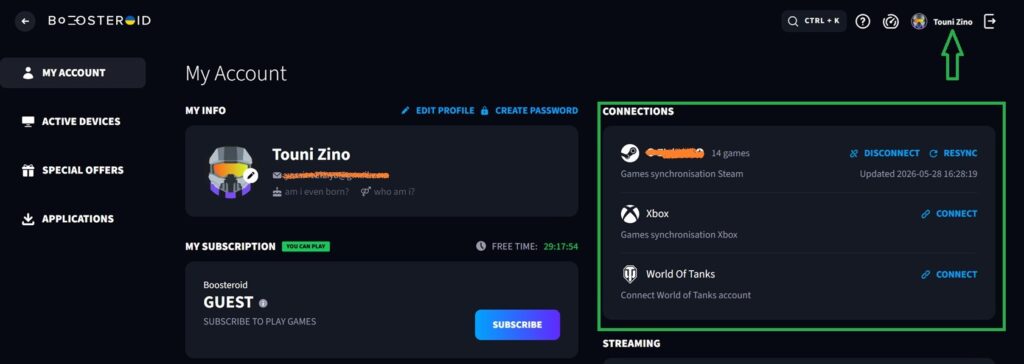
Boosteroid Pricing and Offers
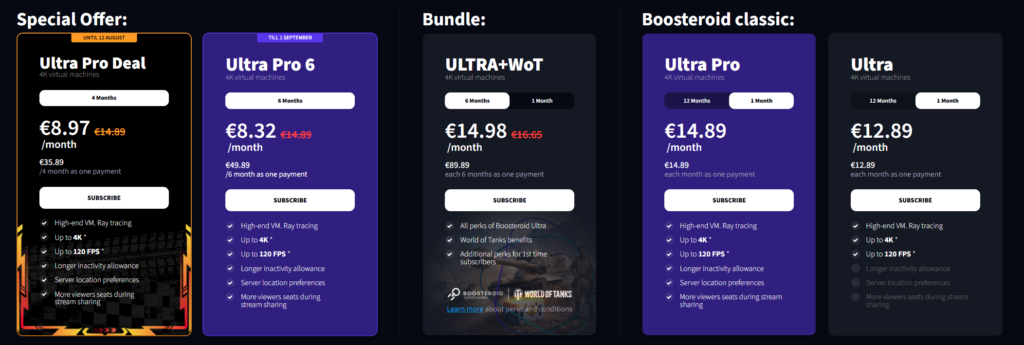
Boosteroid Pricing Plans & Offers
| Plan & Category | Pricing, Duration & Features |
|---|---|
Ultra Pro Deal Special Offer (Until Aug 12) |
€8.97 / mo €14.89
4 Months (€35.89 single payment)
4K @ 120 FPS
High-end VM with Ray Tracing, longer inactivity allowance, server location preferences, and expanded viewer seats during stream sharing. |
Ultra Pro 6 Special Offer (Till Sep 1) |
€8.32 / mo €14.89
6 Months (€49.89 single payment)
4K @ 120 FPS
Best long-term value. Includes all Ultra Pro perks: Ray Tracing, extended inactivity limits, server location preferences, and extra stream sharing seats. |
ULTRA + WoT Gaming Bundle |
€14.98 / mo €16.65
6 Months (€89.89 single payment)
World of Tanks Bonus
Includes all Boosteroid Ultra features combined with exclusive World of Tanks benefits and extra perks for first-time subscribers. |
Ultra Pro Boosteroid Classic |
€14.89 / mo
1 Month (€14.89 single payment)
4K @ 120 FPS
Full-featured monthly Ultra subscription. Includes high-end VM, Ray Tracing, longer inactivity allowance, server location selection, and extra stream seats. |
Ultra Boosteroid Classic |
€12.89 / mo
1 Month (€12.89 single payment)
4K @ 120 FPS
Standard 4K cloud gaming plan with Ray Tracing. (Excludes longer inactivity allowance, server preferences, and extra stream sharing seats). |
The Ultra Pro plan is worth it and i recomended its only €2 deference from the base plan. it allos you to choose your server, get a longer grace period before a session closes, or stream your gameplay to more viewers through Boostcast. For most casual players, the regular Ultra plan is enough.
Note: Subscriptions come with unlimited monthly playtime
Final Verdict
So, is Boosteroid worth it? For most casual and budget conscious gamers, yes. It’s one of the more affordable ways into cloud gaming. It doesn’t limit your hours. And it runs on almost anything you own. But the trade offs are real. A smaller library than the biggest competitor. No server choice on the entry plan.
If it runs smoothly from your location, low ms, no lag and supports your favorite games, there there is not better service i recommend
My rating: 7.5/10. A genuinely good value pick, with a few rough edges worth knowing about before you subscribe.
Boosteroid Pros and Cons
| Pros | Cons |
|---|---|
✓
Noticeably cheaper than GeForce NOW at every tier. |
✕
Smaller game library than its competitor 1,700+ vs 4,500+. |
✓
No monthly playtime cap on paid plans. |
✕
Can’t choose your server on the base Ultra plan. |
✓
Works on many devices, including smart TVs and Linux. |
✕
No refunds once a subscription is activated. |
✓
Supports up to 4K & 120 FPS high-framerate streaming. |
✕
Some users report input lag and queue times depending on location. |
✓
Regularly adding new games, including PC Game Pass titles. |
✕
No Free Tier. |
FAQs
Boosteroid makes the most sense for casual gamers. If you don't need the highest possible frame rates and just want to play your existing library without buying new hardware, this is a good fit.It's also great for laptop owners whose machines can't handle modern games, and for travelers who want to game on the go without carrying a gaming rig.Budget conscious players will like it too. It's a lot cheaper to pay a small monthly fee than to upgrade a graphics card.It also works as a console alternative. If you already own your games on PC stores, you can play them on your TV without buying a PlayStation or Xbox.
If you seeck a higher library game support, your game is not there or you play fps online games and you're server is over 30ms - then you should consider another alternatives with a closer server.
Play PC Games Instantly
No downloads. No expensive gaming PC. Play your Steam, Epic and other supported games directly from the cloud.